How to Use the Auckland Unitary Plan Maps to Check Your Property's Zoning
A Practical Guide to Finding Your Property Zone with the Auckland Unitary Plan Maps
Key Takeaways
- The Auckland Unitary Plan (AUP) is the master rulebook for all property development and land use across Auckland.
- You can find your property’s specific zoning by searching your address in the free Auckland Council Unitary Plan viewer.
- Your property's zone determines the base rules for things like building height, density, and what activities are allowed.
- Overlays and controls are extra layers of rules that can add further restrictions or permissions on top of your base zoning.
- Major updates like Plan Change 120 are significantly changing housing rules, making it vital to have current information. You must check separate maps and rules that apply under PC120.
Thinking about developing or investing in property in Auckland?
The first step in any project, big or small, is understanding the rules. In Auckland, that rulebook is the Auckland Unitary Plan (AUP). It governs everything from building a new deck to subdividing a section or constructing an apartment block. For a complete overview of the Auckland Unitary Plan itself, see our guide here.
The AUP can feel like a massive, complex document, but the council provides a powerful tool to help you get started: the online AUP maps. This guide is designed to walk you through exactly how to use them.
And understanding these rules has never been more important. Auckland's planning framework is undergoing a major shift. The city's new planning instrument, Plan Change 120, aims to enable the development of up to two million additional homes. At the same time, in response to the 2023 floods, there's a new focus on resilience. This means that while intensification is being encouraged, stronger hazard protections are being introduced to focus growth in safer, well-connected locations.
This article will show you how to conduct your own initial due diligence, empowering you to find your property's zoning and identify the key controls that affect its development potential.
First, What Are AUP Zones?
Think of zoning as the foundation of the plan. Every property in Auckland has a zone, which sets the baseline for what you can do with it. These zones are broadly categorised into types like residential, business, rural, and special purpose. For most homeowners and residential developers, the key ones are the house and business zones.
These range from the Single House Zone, which protects special character areas, to the high-density Terrace Housing and Apartment Buildings Zone, designed for urban intensification around transport hubs and town centres. Business zones similarly provide for commercial zoning of a range of levels ranging from Neighbourhood Centre Zone through to Metropolitan Centres. There are also industrial zones. Each zone has different rules for building height, density, and site coverage. Before you look up your address, it's helpful to understand how Auckland Unitary Plan zoning works in more detail.
How to Find Your Property Zoning in Auckland: A Step-by-Step Guide
Finding your zone is a straightforward process. The Auckland Council’s Unitary Plan map viewer, is your go-to tool. Here’s how we do it.
Step 1: Open the Auckland Unitary Plan Map Viewer
Your first step is to open the official AUP map on the Auckland Council website: https://unitaryplanmaps.aucklandcouncil.govt.nz/upviewer/.
Step 2: Search for Your Property
In the top left corner, you’ll find a search bar. Simply type in the address of the property you're interested in and press enter. The map will automatically zoom in and centre on that specific property, highlighting its boundary.
Step 3: Identify Your Zone
Once the property is selected, a panel will appear on the left-hand side of the screen (or in a pop-up) with detailed information. The very first thing you'll see is the "Zoning". It will state the full name, such as 'Residential - Mixed Housing Urban Zone' or 'Business - Town Centre Zone'. The map itself is also colour-coded, and you can use the legend to see what each colour represents.
Step 4: Check for Overlays, Controls, and Other Designations
This is a critical step that many people miss. Zoning is just one piece of the puzzle. Scroll down the information panel and you will see sections for Overlays, Controls, Precincts, and Designations. These are additional layers of rules that sit on top of the base zone.
In our experience, this is where the real potential or restrictions of a site are often found. A property might be in a high-density zone, but a 'Notable Tree Overlay' or a 'Coastal Inundation Control' could significantly impact what and where you can build. Don't skip this part.
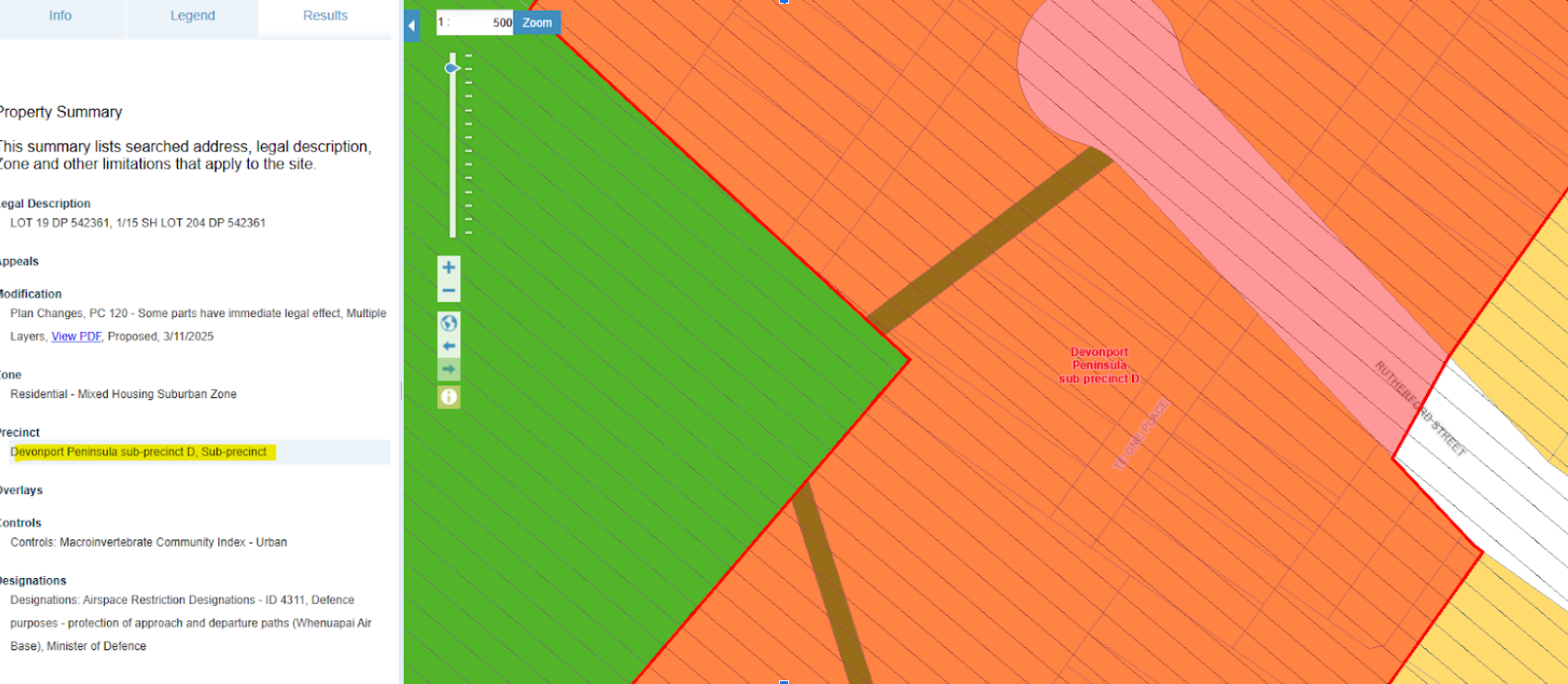
These are listed below zoning in the search results on the left hand side of the page. If you click any of these additional layers the extent of the control will show up on the planning maps. See below example where the precinct has been clicked and shows up as a red layer showing the extent of the precinct:
You've Found Your Zone – Now What?
So, you’ve found your property’s zone and identified its overlays. What does this information actually mean for your development plans? It determines everything.
The combination of your zone and any applicable controls dictates the specific development standards you must meet. These plan rules cover everything from how many dwellings you can build to how high you can go. For instance, the 'Residential - Mixed Housing Urban' zone generally allows for a building height of up to 11 metres, while the 'Terrace Housing and Apartment Buildings Zone' permits up to 16 metres. Exceeding these height limits or failing to meet other standards for things like setbacks or site coverage is a common trigger for needing permission from the council. Now that you know your property's zoning, find out if you [need a land use consent for your plans](http://www.urbanplan.co.nz/landuse-consents).
A resource consent is the formal approval you need from the council when your project doesn't fully comply with the rules of the Auckland Unitary Plan Operative in Part. Getting this right is essential for any successful subdivision or building project.
Ready to Unlock Your Property's Potential?
Using the AUP maps to find your zone is an excellent first step for any property owner, investor, or developer in Auckland. It gives you a snapshot of the base-level potential of your site.
But it is just a first step. Interpreting what the combination of zones, overlays, and the hundreds of pages of plan rules actually means for your specific vision requires expertise. A common mistake we see is people making expensive decisions based only on the zone, without understanding the impact of a specific control or a proposed plan change.
If you're ready to move from initial research to a formal assessment, we're here to help. We offer up to
30 minutes of free no-obligation advice to discuss your project and help you understand what the AUP rules mean for you. Get in touch with our team of planning experts today, and let's explore what's possible.
Disclaimer: The information provided in this article is for general guidance on using the Auckland Unitary Plan maps and does not constitute professional planning or legal advice. The Auckland Unitary Plan is a complex legal document, and its rules are subject to change. You should seek professional advice from a qualified planner for your specific situation before making any decisions related to property development, investment, or land use.